
Guides / Claude Duet connectors and MCP · Updated 23 October 2026
Claude Duet connectors and MCP servers
Claude Duet is only as useful as the apps it can reach. It does not have its own list of integrations: it uses the connectors on your Claude account, the same ones the Claude app uses, including remote MCP servers you add yourself. This guide shows how that works and how to add a custom MCP server, with our own parts-ordering server as the example.
Where Duet’s tools come from
When you open Duet, your connected apps, memory and skills carry over from your Claude account. There are two kinds of connectors:
- Connectors from the Claude Marketplace. Anthropic says Duet can use more than 6,000 connectors and plugins there. It names Gmail, Slack, QuickBooks, Stripe, Gusto, LinkedIn, Docusign, HubSpot, Canva and Shopify.
- Custom connectors. A remote MCP server you add by URL. This is how you give Duet a tool that is not in the marketplace: an internal system, a niche supplier, or a specialist service such as Next Everything for electronic parts.
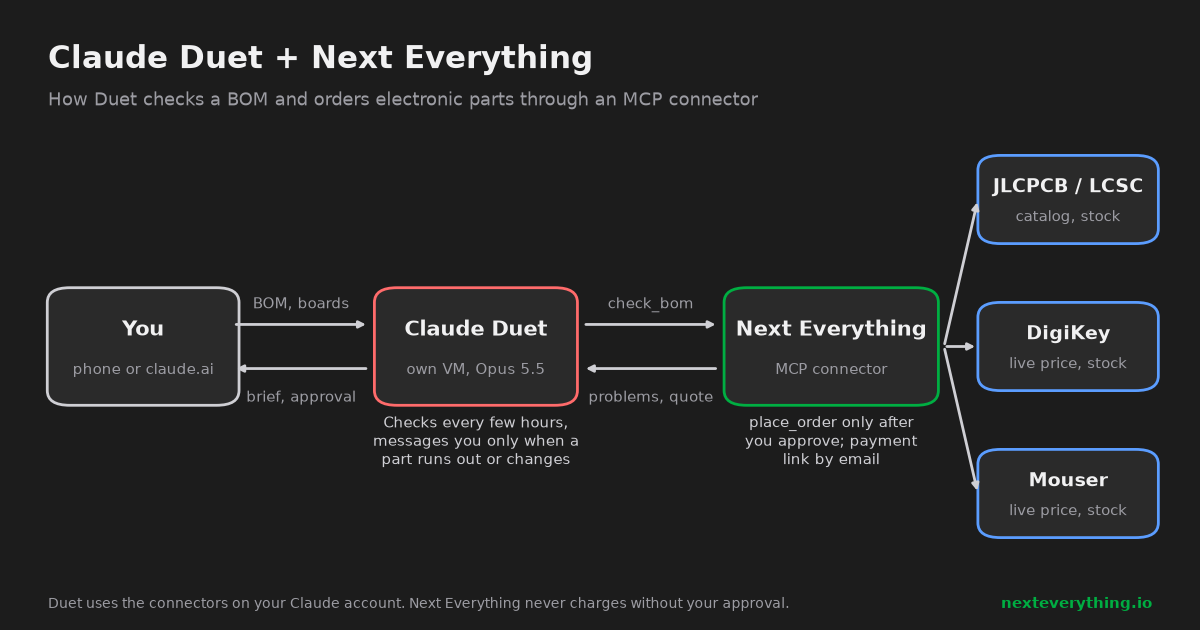
Add a custom MCP server to Claude Duet
Duet takes the connectors from your account, so you add the server once on claude.ai (or in the Claude desktop app) and Duet picks it up:
- Open Settings → Connectors → Add custom connector.
- Give it a name and paste the server’s URL. Many servers, ours included, put the API key in the URL; others start an OAuth sign-in.
- Open Duet and ask it which tools it has from that connector. It should list them.
The exact steps for Next Everything, with the URL to copy, are on the Claude Duet setup page.
What Duet does with a connector on its own
Duet reads, searches, drafts and prepares work without asking. Anything that sends a message, pays, signs or deletes is shown to you first and waits for your approval. Anthropic says approvals go through what it calls the auto mode classifier, and it describes the rule by type of action rather than by app, so it should cover a custom connector the same way as a marketplace one.
A well-built MCP server adds its own guard on top. Next Everything is an example: Duet can check a BOM, search parts and prepare a quote freely, but place_order only re-checks stock and price and emails you a payment link. Nothing is charged until you pay it yourself.
| Next Everything tool | What it does | Changes anything? |
|---|---|---|
find_parts, get_part | Search parts, show one part with prices and stock | No |
check_bom | Price a whole BOM for N boards, flag problems | No |
find_alternatives | Checked replacements for a part | No |
create_project, update_bom_line | Keep the BOM on a live project page | Only your project page |
place_order | Prepare the order, email a payment link | Yes, but no money moves without you |
Choosing what to connect
- Connect what Duet should watch, not everything you have. Each connector is something it reads every few hours and something a bad email could try to steer. Anthropic has prompt injection defenses, and no vendor claims they are perfect.
- Treat a connector URL with a key in it like a password. If it leaks, create a new key and update the connector.
- Prefer servers that ask before spending. Duet’s approval step is one layer; a server that never charges on its own is a second one.
- You can disconnect any app from Duet at any time.
Usage limits
Every background check is model work. Duet shares the usage limits of your Pro or Max plan, so a connector Duet checks every few hours costs more of your limit than one you use in a chat now and then. Tell Duet how often a source really needs checking.
If a custom connector does not show up
- Check that it works in the normal Claude app first. If Claude cannot see its tools, Duet cannot either.
- A
401error means the key in the URL is wrong or expired. - Duet is a research preview. If a connector you added later is missing, reopen Duet; if it is still not there, remove the connector on claude.ai and add it again.
Related
- Mouser vs DigiKey: price comparison on a real 48-line BOM
- How much JLCPCB extended part fees really cost: a 48-line BOM example
- JLCPCB basic parts: which resistor and capacitor values have no extended fee
- 3.3 V LDO at JLCPCB: when the extended part is cheaper than the basic one
- Microcontroller prices at JLCPCB, DigiKey and Mouser: ESP32-S3, STM32G030, ATmega328P, RP2040
- DigiKey and Mouser minimum order quantities: how a $0.001 resistor ends up costing $15
- How to replace an obsolete or out-of-stock part in your BOM: four real examples
- How to find an equivalent electronic component: AO3400, SS34, LM358 and NE555 examples
- Octopart alternatives: other ways to compare electronic part prices and stock
- CH340 vs CP2102N vs FT232RL: USB-to-UART chip prices and stock in 2026
- STM32F103C8T6 alternatives: GD32, CH32 and APM32 prices compared
- ESP32 module prices: ESP32-S3, C3, C6 and WROOM-32E at JLCPCB, DigiKey and Mouser
- What is Claude Duet? Anthropic’s proactive AI agent: features, price and availability
- Claude Duet for hardware teams: BOM stock and price alerts every day
- Claude Duet vs Meta Muse vs OpenAI dots vs Grok Bot: personal AI agents compared
- Meta Muse AI agent: what it does, what it costs, and Muse for Small Business
- OpenAI dots explained: ChatGPT’s always-on agents, price, Custom Rules and limits
- Grok Bot: xAI’s always-on AI agents, MCP support, pricing and limits
- Personal AI agents in 2026: Claude Duet, Muse, dots, Grok Bot, Hark Pro, Instinct and Fo
- Can an AI agent order electronic parts for you? Claude Duet, Grok Bot, Claude Code and others
- AI BOM checker
- Find alternative electronic parts with AI
Sources
- Anthropic: Introducing Claude Duet (21 October 2026)
- TechCrunch: Claude Duet app is Anthropic’s bet on agents
- CNBC: Anthropic announces preview of Claude Duet
About this guide
We build Next Everything, an MCP server that lets AI assistants and agents check a BOM against the JLCPCB/LCSC catalog and live Mouser and DigiKey prices, and order the parts you approve. Features, prices and availability here are as announced by each company and reported in the press on the date above. These products are in beta or preview and change often.
Next Everything is not affiliated with Anthropic, Meta, OpenAI, xAI, Hark or the other companies named here. Product names belong to their owners.