
Guides / OpenAI dots · Updated 23 October 2026
OpenAI dots: ChatGPT’s always-on agents
OpenAI announced dots at DevDay on 29 September 2026: agents inside ChatGPT that keep working between conversations, each with its own cloud computer and browser. They run on GPT-6 Astra and come with ChatGPT Pro. Here is what they do and what they cost, as of 23 October 2026.
What a dot does
- Its own computer: an isolated Linux environment with Chrome. You can watch it work and press Take over.
- Your computer, if you allow it: local files, skills and your local browser, off by default.
- Codex: a dot can start cloud tasks in Codex environments you already set up.
- Scheduled and recurring tasks, and read-only background research that saves private notes.
- Where you talk to it: ChatGPT on desktop, web and mobile, voice calls, Slack and Microsoft Teams. Texting is a limited beta for US Pro users.
- Apps: the same plugin permissions as ChatGPT and Codex, which OpenAI says reach over 4,000 apps.
Custom Rules
Dots have the most detailed controls of the new agents. Each supported action can be set to one of four behaviors:
| Setting | Meaning |
|---|---|
| Act without asking | The dot just does it |
| Act if pre-approved | Only when you asked for that action in your prompt |
| Ask first | The dot prepares it and waits |
| Hand off | The dot gives the step back to you |
Below that there is a floor you cannot change: password changes and money transfers always come back to you, permanent deletion and software installs may need approval every time, and purchases on saved cards need approval (which can be given in advance for one specific purchase). An auto-review the dot cannot switch off checks planned emails and file changes.
Price and plans
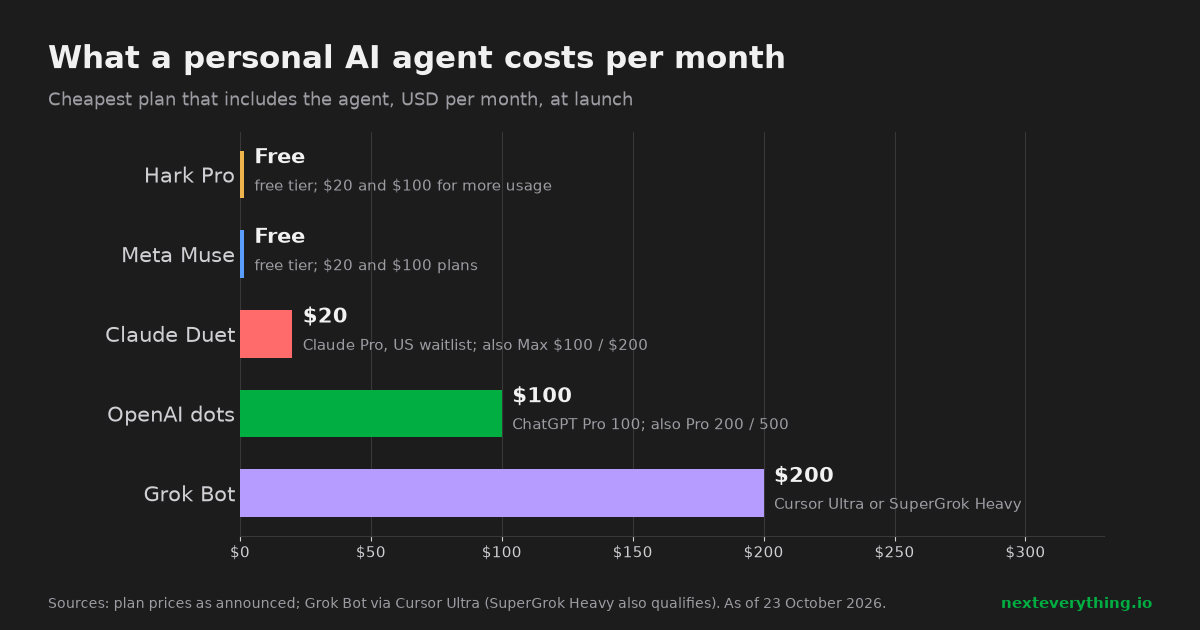
- The first dot comes with ChatGPT Pro 100 ($100/month), Pro 200 and Pro 500, and with Business Premium seats.
- Free, Go ($8) and Plus ($20) do not include a dot.
- More dots and more capacity are planned, without prices yet.
- Dot conversations use a separate “deeper work” allowance, extended for the first month. Tasks a dot starts in Codex or ChatGPT Work count against your normal limits.
Availability
- Pro rollout excludes the EEA, Switzerland and the UK. Business Premium is listed for all supported regions.
- Enterprise, Edu and Healthcare have a beta that admins enable.
- Not for users under 18. A dot is created on desktop or desktop web, not on mobile.
Memory: one thing to know
Dots start with your ChatGPT memories and form their own, including from connected apps. According to OpenAI’s help text as summarized in coverage, a dot’s individual memories cannot be viewed or edited, only removed by deleting the whole dot, and disconnecting an app does not erase what was already learned. Connect accordingly.
Dots vs Claude Duet
| OpenAI dots | Claude Duet | |
|---|---|---|
| Entry price | $100/month (Pro 100) | $20/month (Claude Pro) |
| Model | GPT-6 Astra | Claude Opus 5.5 |
| Approvals | Four levels per action, fixed floor | Fixed: send, pay, sign, delete wait for you |
| See the browser | Yes, with Take over | Not yet |
| Own MCP server | Not stated | Yes, custom connector |
| Where | Not UK, CH, EEA at launch | US waitlist |
For coding work OpenAI already has a direct route to MCP servers: Codex CLI reads them from its config file, so you can source a BOM from there today. Full comparison: Duet vs Muse vs dots vs Grok Bot.
Related
- Mouser vs DigiKey: price comparison on a real 48-line BOM
- How much JLCPCB extended part fees really cost: a 48-line BOM example
- JLCPCB basic parts: which resistor and capacitor values have no extended fee
- 3.3 V LDO at JLCPCB: when the extended part is cheaper than the basic one
- Microcontroller prices at JLCPCB, DigiKey and Mouser: ESP32-S3, STM32G030, ATmega328P, RP2040
- DigiKey and Mouser minimum order quantities: how a $0.001 resistor ends up costing $15
- How to replace an obsolete or out-of-stock part in your BOM: four real examples
- How to find an equivalent electronic component: AO3400, SS34, LM358 and NE555 examples
- Octopart alternatives: other ways to compare electronic part prices and stock
- CH340 vs CP2102N vs FT232RL: USB-to-UART chip prices and stock in 2026
- STM32F103C8T6 alternatives: GD32, CH32 and APM32 prices compared
- ESP32 module prices: ESP32-S3, C3, C6 and WROOM-32E at JLCPCB, DigiKey and Mouser
- What is Claude Duet? Anthropic’s proactive AI agent: features, price and availability
- Claude Duet connectors and MCP: how to add your own tools to Duet
- Claude Duet for hardware teams: BOM stock and price alerts every day
- Claude Duet vs Meta Muse vs OpenAI dots vs Grok Bot: personal AI agents compared
- Meta Muse AI agent: what it does, what it costs, and Muse for Small Business
- Grok Bot: xAI’s always-on AI agents, MCP support, pricing and limits
- Personal AI agents in 2026: Claude Duet, Muse, dots, Grok Bot, Hark Pro, Instinct and Fo
- Can an AI agent order electronic parts for you? Claude Duet, Grok Bot, Claude Code and others
- AI BOM checker
Sources
About this guide
We build Next Everything, an MCP server that lets AI assistants and agents check a BOM against the JLCPCB/LCSC catalog and live Mouser and DigiKey prices, and order the parts you approve. Features, prices and availability here are as announced by each company and reported in the press on the date above. These products are in beta or preview and change often.
Next Everything is not affiliated with Anthropic, Meta, OpenAI, xAI, Hark or the other companies named here. Product names belong to their owners.